Parcourir les catégories
Français
$
USD
Connectez-vous à votre IA
Fusion de courrier, modèles Excel, PDF vers Excel et automatisation Python
Projet récent (outil Excel vers Word pour une société immobilière britannique), avis 5 étoiles : « transformer un travail très tedieux en une solution facile ».
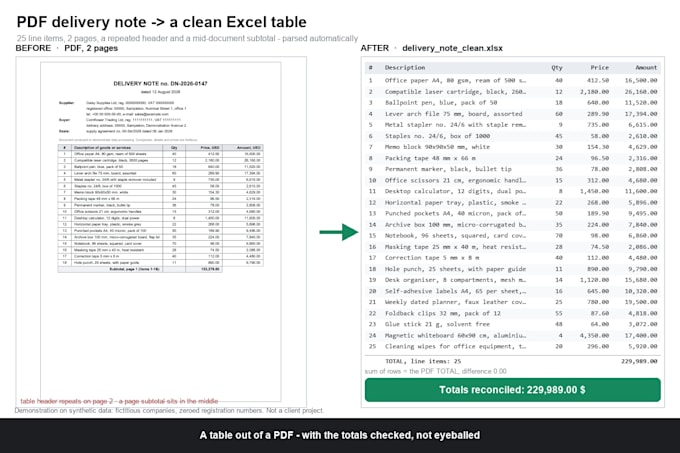
Ce qui garantit le bon fonctionnement sur des documents réels : les tableaux qui se cassent sur plusieurs pages avec l’en-tête qui se répète (les répétitions sont supprimées), les lignes de sous-total qui se trouvent au milieu du document (séparées des articles réels), les chiffres écrits comme 1 234 567,89 ou 1,234,567.89 (les deux se lisent correctement), et les noms d’articles longs qui s’enroulent dans une cellule (retenus ensemble).
Il contrôle aussi son travail : la somme des lignes extraites est comparée au total imprimé dans le PDF, et la quantité x prix est recomposée pour chaque ligne. Tout élément en désaccord est signalé dans le fichier, afin que vous le voyiez maintenant et non dans un mois.
Même type de PDF chaque mois ? Premium ajoute un convertisseur que vous relancez vous-même.
Vous n’êtes pas sûr que cela vous convienne ? Envoyez une page avant de commander. Je répondrai avec les premières lignes en Excel, gratuitement, et vous dirai si c’est du texte ou une numérisation.

Convertir d'un:
Convertir en:
XLS, XLSX
Traduction automatique
Que se passe-t-il si la mise en page de mon PDF change le mois prochain ?
Le script associe les colonnes par leur nom, pas par leur position, donc les petits changements sont généralement pris en compte. Une mise en page complètement différente nécessite une petite mise à jour — c’est ce que le forfait Standard avec 3 mises en page permet.
Dois-je installer quelque chose ?
Non. Les offres Basic et Standard livrent uniquement le fichier Excel. Premium ajoute un convertisseur : Python est installé une fois avec un guide étape par étape pour Windows, puis une ligne par exécution. Sur Mac, demandez-moi avant de commander.
Et si un chiffre sort incorrect ?
Chaque total du PDF est comparé à la somme des lignes extraites, et quantité × prix est recalculée pour chaque ligne. Tout élément qui ne correspond pas est signalé dans le fichier, et je le corrige lors de vos révisions.
Pouvez-vous traiter des PDFs scannés ?
Parfois. Une numérisation est une photo de papier, donc le texte doit être reconnu et vérifié. Envoyez-moi une page d’abord et je vous dirai honnêtement si le résultat sera fiable, avant que vous ne payiez quoi que ce soit.